
Seasonal Campaign Playbook: Black Friday & Cyber Week
Peak trading weeks punish preparation gaps rather than strategy gaps. The campaigns that fail are rarely badly conceived; they fail because a template was still pending approval on the morning of the sale, or because the inbox filled faster than anyone could answer it, or because the whole list got the same message and a chunk of it left.
This playbook is a countdown. Work backwards from the sale date and most of the failure modes disappear.
Four weeks out: fix the foundations
Nothing in this section is glamorous and all of it is load-bearing.
Check the channel is healthy. Open Connect Account, click Manage on your WhatsApp row, and on WhatsApp Integration expand Business Accounts to reach the Phone Numbers table. STATUS should read Active and MESSAGING LIMIT gives you your tier — because that tier caps how many unique customers you can start conversations with in a twenty-four hour period. Discovering your tier during the sale is too late; the number is visible now.
Audit the list. Segment it, and be honest about what is in it. Contacts who have never interacted, or who came from somewhere you cannot document consent for, will generate blocks under campaign volume and drag your quality rating down at exactly the wrong moment. Excluding them is a better decision than sending to them.
Warm the list gently. If your last message went out six months ago, a peak-week promotion is a bad reintroduction. One useful, non-promotional message a few weeks beforehand — a genuine restock, a service update — re-establishes that you exist.
Decide what you are actually promoting. Peak weeks reward one clear offer communicated repeatedly, not a catalogue. If your message needs a paragraph to explain, it will not survive a phone screen.
Three weeks out: templates
This is the deadline people miss, so treat it as the hard one.
Every message you send outside the 24-hour window needs an approved template. Approval is not instant and rejections happen for small reasons — a placeholder in the wrong place, a category mismatch, wording that reads as unsolicited. Submitting three weeks out gives you time to fix one and resubmit.
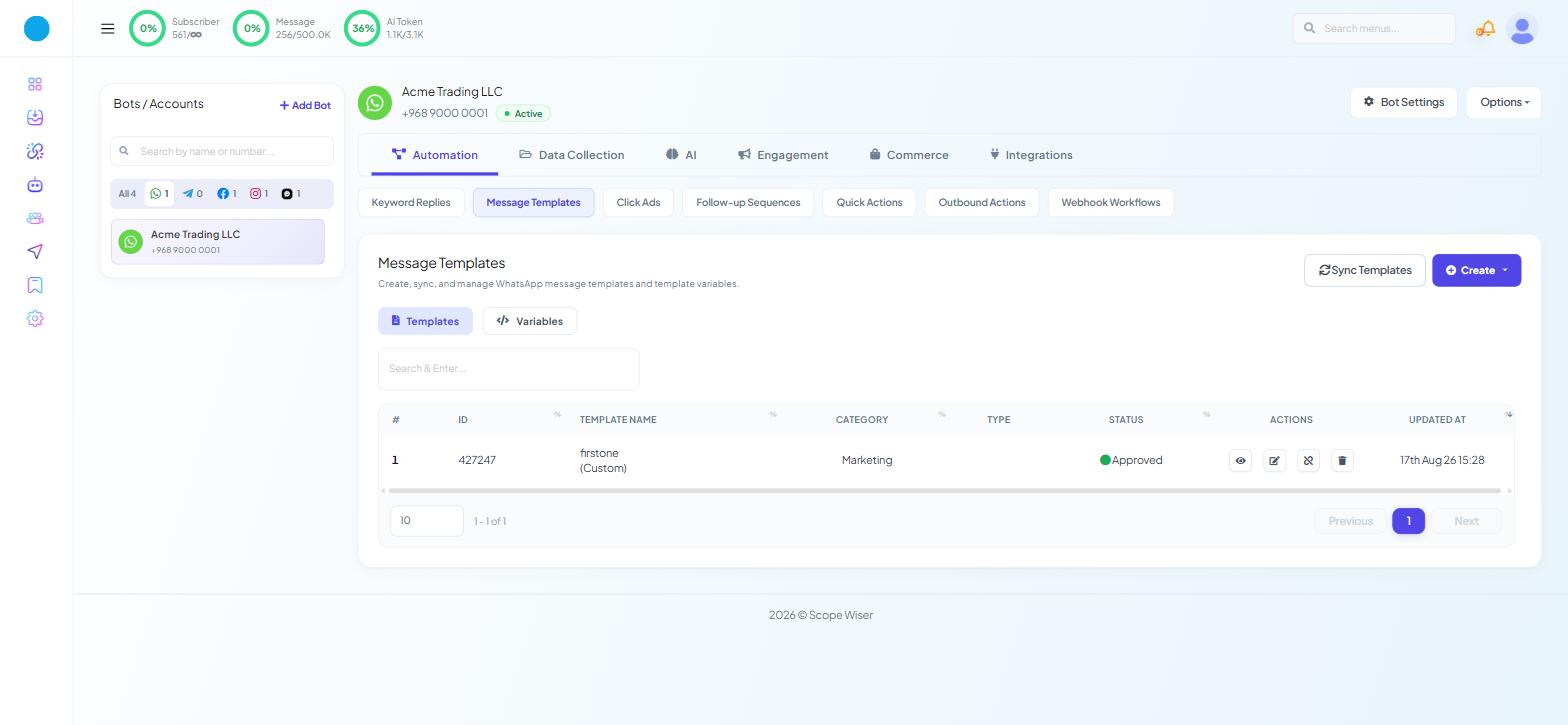
Templates are managed under Chatbot Manager › Automation › Message Templates, where the Templates and Variables views sit side by side. Submit the full set now:
The announcement — sale starts, what the offer is.
The reminder — mid-sale, ideally differentiated by segment.
The last-call — final hours, genuine deadline.
The basket recovery message.
An operational template for delays or stock issues. You will need this and you will not have time to write it later.
Build in more variables than you think you need. A template with placeholders for name, product and discount code can serve several segments; one with the offer hard-coded into the body can serve exactly one, and you cannot edit an approved template quickly.
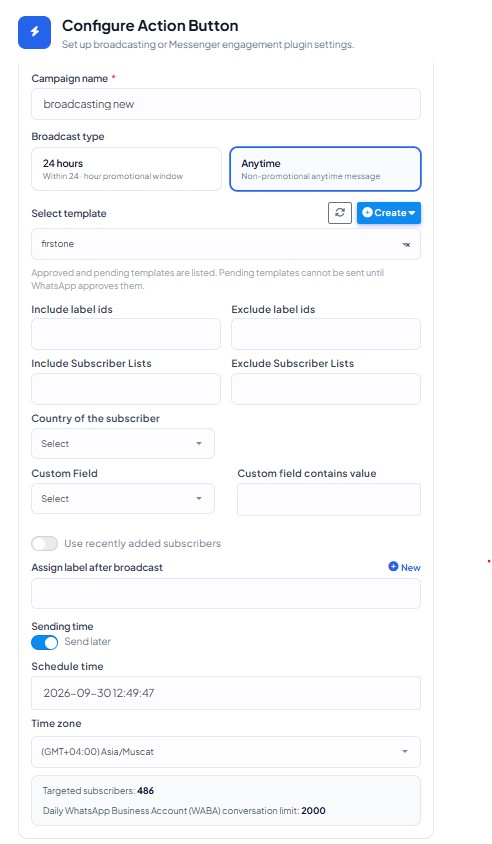
When you select a template in a campaign, the interface reminds you that "Approved and pending templates are listed. Pending templates cannot be sent until WhatsApp approves them." Pending is not ready.
Two weeks out: segments, flows and entry points
Build the segments you will actually send to. Labels and lists in the Subscriber Manager are what the campaign audience controls read from. A workable minimum for a sale:
Bought in the last twelve months.
Bought more than twelve months ago.
Engaged but never purchased.
High-value repeat customers, who get early access rather than the same offer as everyone else.
An exclusion list — people who have complained recently, opted out, or already bought the item you are promoting.
That last one matters more than the others. Promoting a discount to someone who paid full price last week generates a refund request and a grievance.
Prepare the flows people will land in. A campaign message that leads to nothing is a wasted send. Whatever the message invites — browse the offer, check stock, claim the code — should be answerable inside the conversation.
Add entry points now. A chat entry point on your site during peak week converts anonymous traffic into contacts you keep afterwards, which is often worth more than the sale itself. These are set up under Chatbot Manager › Engagement › Chat Entry.
Set up basket recovery before the traffic arrives, not during it. Check which route your store needs first — on Shopify it is a built-in Store Automation action, on WooCommerce it needs a WordPress plugin and a webhook workflow, and either way only baskets carrying a phone number can be recovered. Abandoned Cart Recovery has the detail.
One week out: rehearse
Send everything to yourself. Every template, on a real phone, through the actual campaign path. Check the variables populate, the links work, and the message reads sensibly when the phone truncates it.
Walk the flows as a customer. Type the wrong thing deliberately. See what happens when someone answers a button prompt with free text.
Agree the inbox rota. Peak week generates support volume, not just orders. Decide who is on, what the filters mean, and how conversations get assigned — the Shared Inbox rail gives you Mine, All, Important, Unread, Archived, Blocked and Resolved, and a team that agrees on those states before the rush will not lose conversations during it.
Write the bad-news message now, while you are calm. Something will be out of stock or late.
Sale week: sending
Schedule rather than sending live. The campaign configuration has a Send later option under Sending time. Use it. Nobody makes good decisions at the moment of launch.
Check the targeted-subscriber count before every send. The configuration shows "Targeted subscribers: N" alongside your daily conversation limit. If N is your entire list on every campaign, your segmentation is not being applied.
Stagger the sends. Splitting a large audience across a few hours keeps your inbox survivable and reduces the chance of hitting your daily limit mid-campaign.
Reserve capacity for replies. Every promotional send generates responses, and those responses are worth more than the send — they reopen the 24-hour window and let you sell conversationally. Sending more than you can answer converts a marketing win into a service failure.
Watch the quality rating daily. A drop from High to Medium during the week is a signal to reduce frequency immediately, not to push harder.
Sale week: follow-up
Follow-up sequences are where peak-week revenue is actually recovered, because plenty of the people who engage do not buy on first contact.
Set them up under Chatbot Manager › Automation › Follow-up Sequences, before the sale.
Keep them short. Two messages, not five. Peak week is crowded and patience is thin.
Stop them on purchase. A follow-up nudge after someone has already bought is the fastest way to earn a block.
Use the last-call message properly. Real deadlines work; fake ones work once.
After: the part that compounds
The week after the sale decides whether you have gained customers or just orders.
Handle the aftermath well. Delivery delays, returns and questions all peak now. Proactive delay notifications generate more goodwill than any discount you sent.
Label everyone who bought. These are next year's early-access segment and this quarter's repeat-purchase target. Applying the label now costs nothing; reconstructing it later is tedious.
Read your own numbers before you read anyone else's. For each campaign, look at processed, delivered, opened and unreached counts in the Broadcast Center, then look at opt-outs and blocks. The second pair tells you whether the audience wanted what you sent.
Write down what broke while you still remember. Template rejected late, segment wrong, inbox understaffed on the Saturday — that list is the plan for the next peak, and it is worth more than any amount of general advice.
What to do next
For the underlying store patterns this playbook accelerates — order updates, cash-on-delivery confirmation, catalogue use — read eCommerce Playbook: WhatsApp for Online Stores. If your flows slowed down under load, Calling External APIs From a Flow covers what to look at.