
Industry Deep Dive: Financial Services & Agent Banking
An agent banking division runs one public WhatsApp number and serves two populations through it. Most of the traffic is retail: savings rates, how to open an account at an agent point, what documents a personal loan needs. Buried inside that volume is a much smaller stream of corporate enquiries — a business wanting to become an agent partner, a distributor asking about liquidity arrangements, an operator planning expansion into new districts.
The retail messages need fast, accurate, identical answers. What a corporate enquiry needs is a qualification conversation and a diary slot with a named officer. One generic bot serves neither well, and the failure is asymmetric: a slow retail answer irritates someone, while a scripted FAQ reply to a serious partnership enquiry ends it.
The fix is two specialised agents on the same number, with routing deciding which one speaks.
The rule that comes before everything
In a regulated environment, an agent that invents an interest rate, a fee, an eligibility threshold or a URL causes real harm — to the customer who acts on it and to you when the complaint arrives.
So the first design decision is not about routing. It is that both agents answer only from their attached knowledge, and say so plainly when a question falls outside it. No inference, no estimation, no "typically around". If the figure is not in the knowledge set, the agent does not have it and hands over.
This has to be enforced in three places at once, because any one of them alone leaks:
In the system prompt, as an explicit prohibition near the top rather than a preference buried in the middle.
In the knowledge set, by keeping current rates and criteria there and refreshing them — a Google Sheet knowledge source is the practical answer for anything that changes, because your product team can update a sheet without touching a prompt.
In AI Configuration, using Restricted Topics under Behavior & Restrictions, with Response for Restricted Keywords carrying the message sent instead.
Agent 1 — Service and Information
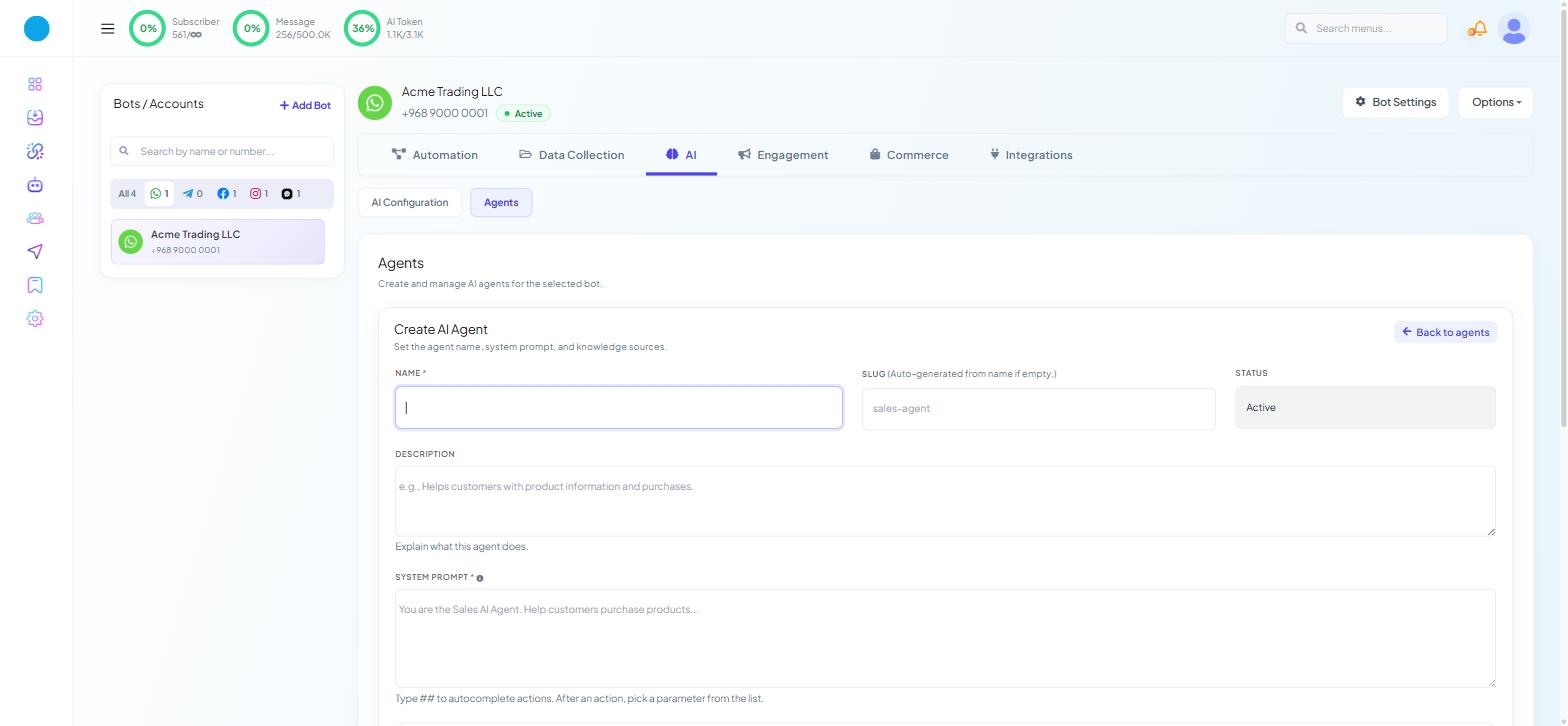
Create it under Chatbot Manager › AI › Agents with + Create Agent. The form takes a NAME, an optional SLUG and DESCRIPTION, the SYSTEM PROMPT, and a Knowledge Set chosen from Select Existing or Create New.
Its knowledge set holds retail material only: account opening requirements, loan types and documentation, agent point procedures, general policies. Rates and thresholds go in via Google Sheet; static policy documents via File or URL.
Its prompt should establish that it answers retail queries accurately and concisely, that it never requests account-specific credentials or authentication details in chat, and that anything requiring an authenticated account view is escalated rather than attempted.
That last constraint matters more than it looks. A customer asking "what is my balance" must be handed to a person or an authenticated channel, not served by an agent that has been given a convenient API.
Agent 2 — Corporate Consultation
A different job entirely: engage a business prospect, qualify them through conversation, save what they tell you, and get a consultation booked.
Its knowledge set holds partnership criteria, district expansion requirements, onboarding timelines and the scope of a business officer consultation — and nothing about retail products, so it cannot drift into answering the wrong audience.
The prompt defines what must be collected before anything else happens. For an agent banking partnership that is typically business type, target location, and approximate monthly transaction volume. The conversational rules matter as much as the list: one or two questions at a time, never re-ask what has been answered, use every detail supplied in a single message, and hold a consultative tone rather than reading out a form.
Saving those answers, applying a label, enrolling a lukewarm prospect in a nurture sequence and launching the booking step are all done with actions inserted into the prompt. Type ## in the SYSTEM PROMPT field and a list of the actions the agent can perform appears; pick the action, then its parameter. Take the names from what your account actually offers.
Routing the two apart
Open Chatbot Manager › AI › AI Configuration and turn on the AI Agent toggle. Select both agents in Active Agents, then build the Agent Routing table with + Add Rule. Each rule describes the kind of message and names the agent that should take it.
Message signals | Agent |
|---|---|
interest rate, open an account, personal loan, required documents, savings, branch, procedure | Service and Information |
agent point, partnership, corporate, liquidity, district expansion, transaction volume, business consultation | Corporate Consultation |
Routing reads intent rather than matching strings, so "we're looking to expand our distribution network into two more districts" reaches the Corporate agent without containing any of those words. And because an agent can transfer a conversation to the other agents listed in Active Agents, a conversation that begins as a retail question and turns commercial moves across without the customer restarting.
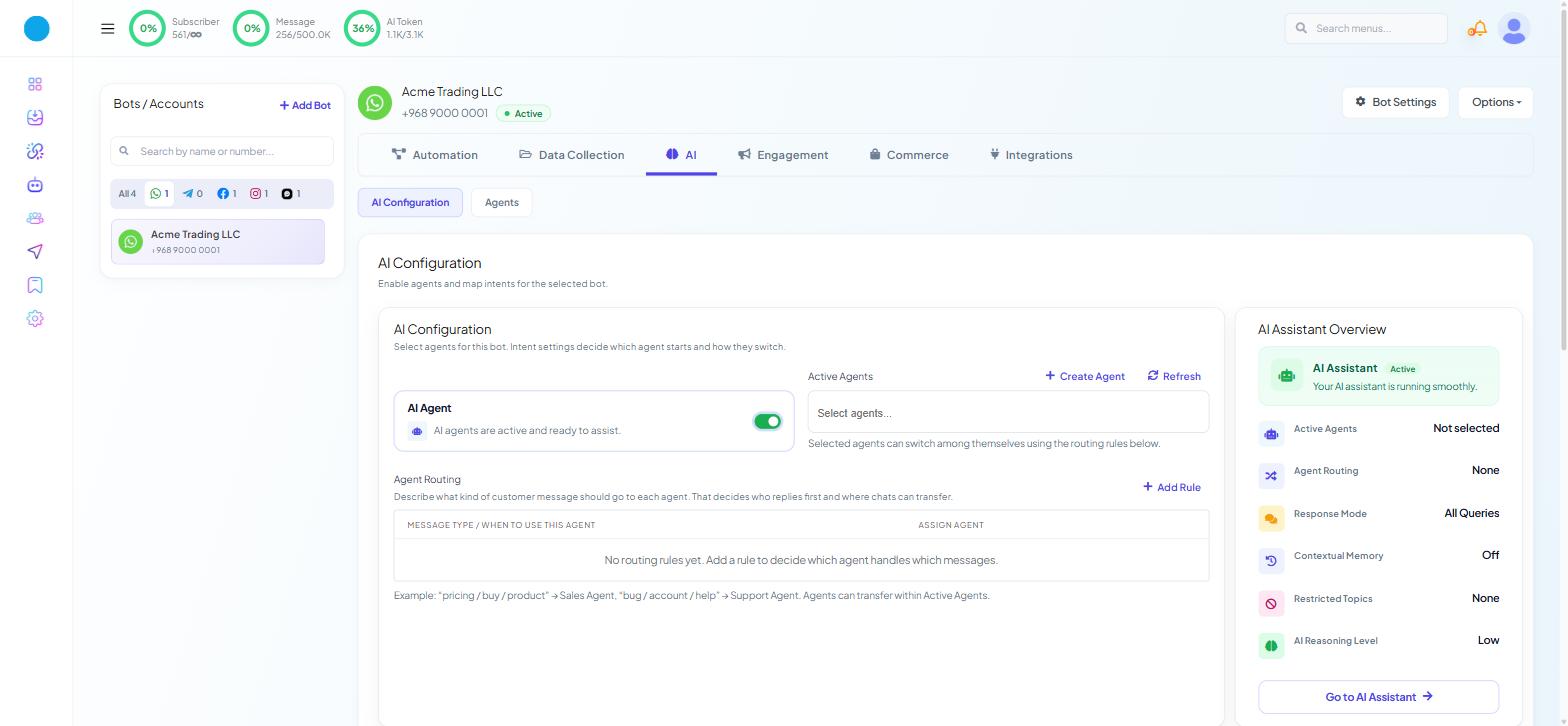
Also switch on Enable Contextual Memory, and set the Memory Window it reveals. A prospect who has given their business type and target districts should never be asked again — in a B2B conversation that single lapse reads as incompetence.
Booking the consultation
The commercial payoff is converting a qualified conversation into a confirmed appointment without leaving the chat, so nothing goes cold in an email thread.
An appointment capability exists in the product: it appears in the permission model as a WhatsApp appointment-system permission under Control Panel › User Permission, and Connect Account › Connect Google opens a Google Integration page described as "Connect and manage your Google accounts, sheets, and calendars", with a Calendar Access counter.
What is confirmable today: a User Input Flow under Chatbot Manager › Data Collection collects a defined set of answers as a single record, and its configuration panel offers Forward Data to Webhook and Sync Data to Google Sheets — enough to push a qualified lead into a CRM or a scheduling system of your own. A Follow-up Sequence under Chatbot Manager › Automation handles the nurture track for prospects not ready to book, and the reminder for those who are.
On WhatsApp, any message sent more than 24 hours after the prospect's last one must use an approved Message Template. Submit the confirmation and reminder templates before you need them.
Handover and the audit trail
Escalated conversations land in the Shared Inbox. The officer who picks one up sees the Customer Snapshot, Automation & Flow, Assigned Agent, Labels, Lists and Message Sequence panels — so a corporate lead arrives already qualified, with the collected fields visible, rather than as a cold transfer.
Have your officers use Pause Bot and Pause AI from Quick Actions before replying.
For supervision, Control Panel › User Permission controls which roles can see conversations at all, and Control Panel › Settings & Integration carries Logged-in Devices, Login Activity and IP Manager — worth configuring before a regulator asks who had access to customer conversations.
What you have to decide yourself
Whether this configuration meets the requirements of your regulator, your licence conditions or your internal risk function is your determination, not a property of any product setting. Settle before launch: what conversation data is retained and for how long, who may access it, what disclosure customers receive about automated handling, and which categories of request are prohibited from automated handling entirely.
Then encode those decisions in the prompts and in Restricted Topics rather than in a policy document nobody reads.
What to do next
For the booking half in detail, read Appointment Booking Automation. The same two-agent split with a different risk profile is worked through in Industry Deep Dive: Healthcare, and if your corporate agent needs to read live data — an application status, a partner record — Calling External APIs From a Flow covers request setup and response mapping.