
Chatbot Trends Worth Building For
Trend lists age badly. The useful question is not what is new this quarter but which shifts have lasted long enough to be worth designing around — and which are still someone else's demo.
What follows is the first group. Each one is a change in what customers now expect, followed by where the corresponding capability actually sits in Scope Wiser, so you can decide whether to act on it rather than just read about it.
1. Bots that speak first
The older model was purely reactive: the customer asks, the bot answers, the conversation ends. Most of the value now sits in the messages nobody asked for — the shipping update, the appointment reminder, the renewal notice, the "your part is back in stock".
Proactive messaging is also where the commercial case is easiest to make, because a message that prevents a support ticket costs less than one that answers it.
In the product this is three separate mechanisms, and picking the right one matters:
Broadcasting for one-off sends to a segment. Create Campaign opens the Flow Builder, and the campaign drawer includes Include label ids, Exclude label ids, Include Subscriber Lists, Country of the subscriber and a Custom Field filter, with a live readout of Targeted subscribers.
Follow-up Sequences under Chatbot Manager › Automation for a timed series that starts when someone enters it.
Webhook Workflows, also under Automation, for messages triggered by something happening in another system — described on screen as building "webhook-based automation workflows" using data received from a third-party webhook call.
On WhatsApp, anything outside the 24-hour window has to be an approved template, so proactive messaging and Message Templates are the same project.
2. Conversations that remember
Customers now expect not to repeat themselves. Having given a name, an order number or a preference once, being asked again reads as incompetence rather than caution.
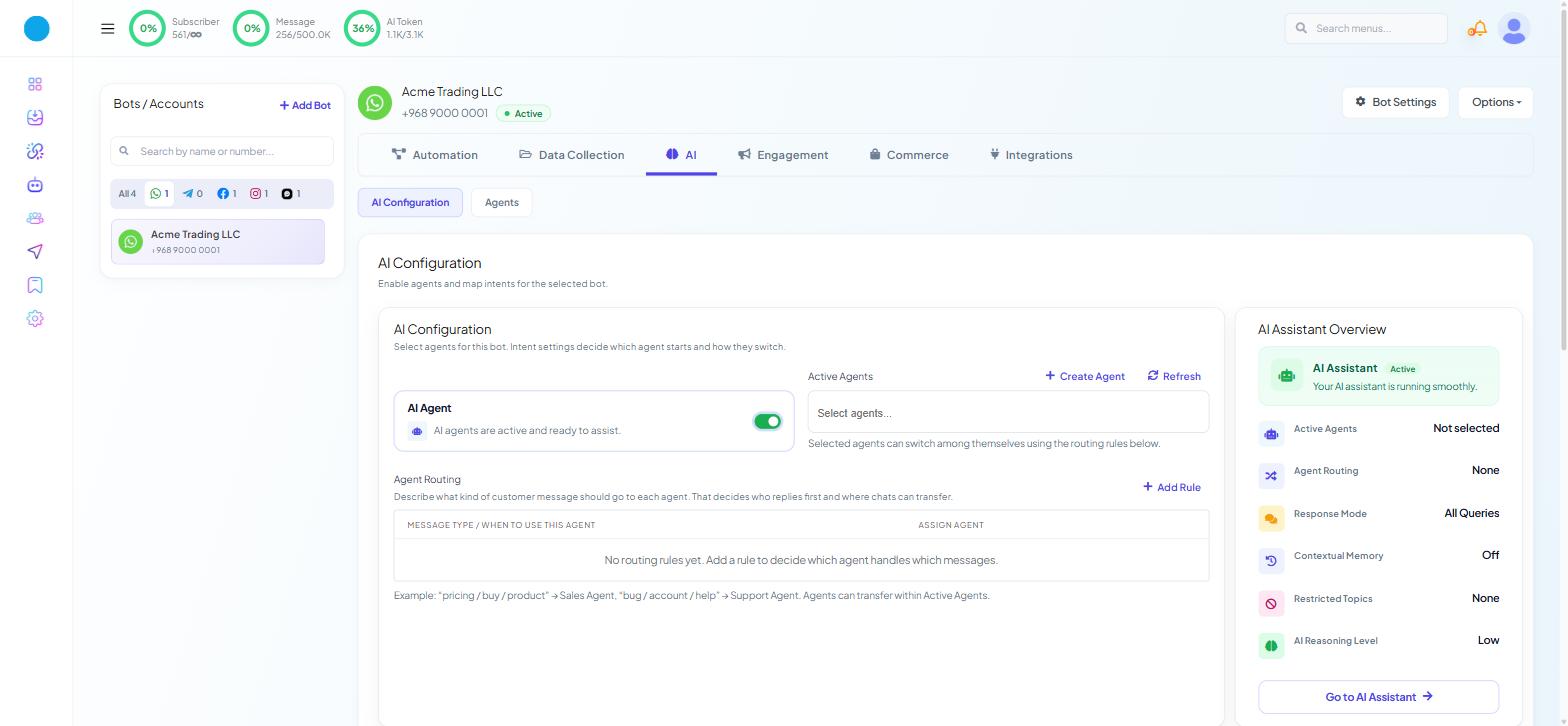
This is a single setting: Enable Contextual Memory in Chatbot Manager › AI › AI Configuration, visible once the AI Agent toggle on that page is on. Switching it on reveals a Memory Window that counts whole conversations. It matters most when a conversation moves between agents, or when someone returns days later.
Memory has a cost as well as a benefit. Anything the agent remembers is data you are holding, so be deliberate about what the agent is instructed to collect in the first place.
3. Several specialists instead of one generalist
The most consequential change in how bots are built. One bot trained on everything answers everything moderately. Several narrow agents, each with its own material and its own instructions, answer their own area well.
Scope Wiser is built around this. Agents are created individually under Chatbot Manager › AI › Agents, each with its own SYSTEM PROMPT and Knowledge Set. In AI Configuration, turn on the AI Agent toggle — nothing below it renders until you do — then select which of them are live in Active Agents and write Agent Routing rules describing what kind of customer message should go to each agent. Agents can transfer conversations to the other agents in that list, so a conversation that changes subject moves to the right specialist without the customer starting again.
Start with two. Sales and support is the usual split, and it is enough to see whether your routing descriptions match how customers actually write.
4. Answers grounded in your own material
Generative answers that come from nowhere in particular are a liability, and buyers have learned to distrust them. The direction of travel is agents that answer only from a defined body of material and say so when they cannot.
That body of material is the Knowledge Set attached to an agent. Sources are added by type — Content, URL, File, Media, Google Sheet or API — and a single set can hold several sources of different types, which the agent draws on together.
Two settings keep it honest. AI as a Fallback Only in AI Response Mode means bot flows and keywords run first, and the AI answers only when nothing matches. And Restricted Topics under Behavior & Restrictions takes a list of subjects the agent must decline, with Response for Restricted Keywords holding what it says instead.
5. Commerce inside the conversation
Browsing, choosing and ordering increasingly happen in the chat window rather than on a website reached from it. This is furthest along on WhatsApp, which is also the only channel where Scope Wiser exposes a Commerce tab — with Store Automation and Product Catalog sub-tabs.
Store Automation is headed "WC/Shopify Automation" and manages WooCommerce and Shopify campaigns for the selected bot. Under Connect Account, the available connections include Shopify, WooCommerce alongside the messaging channels.
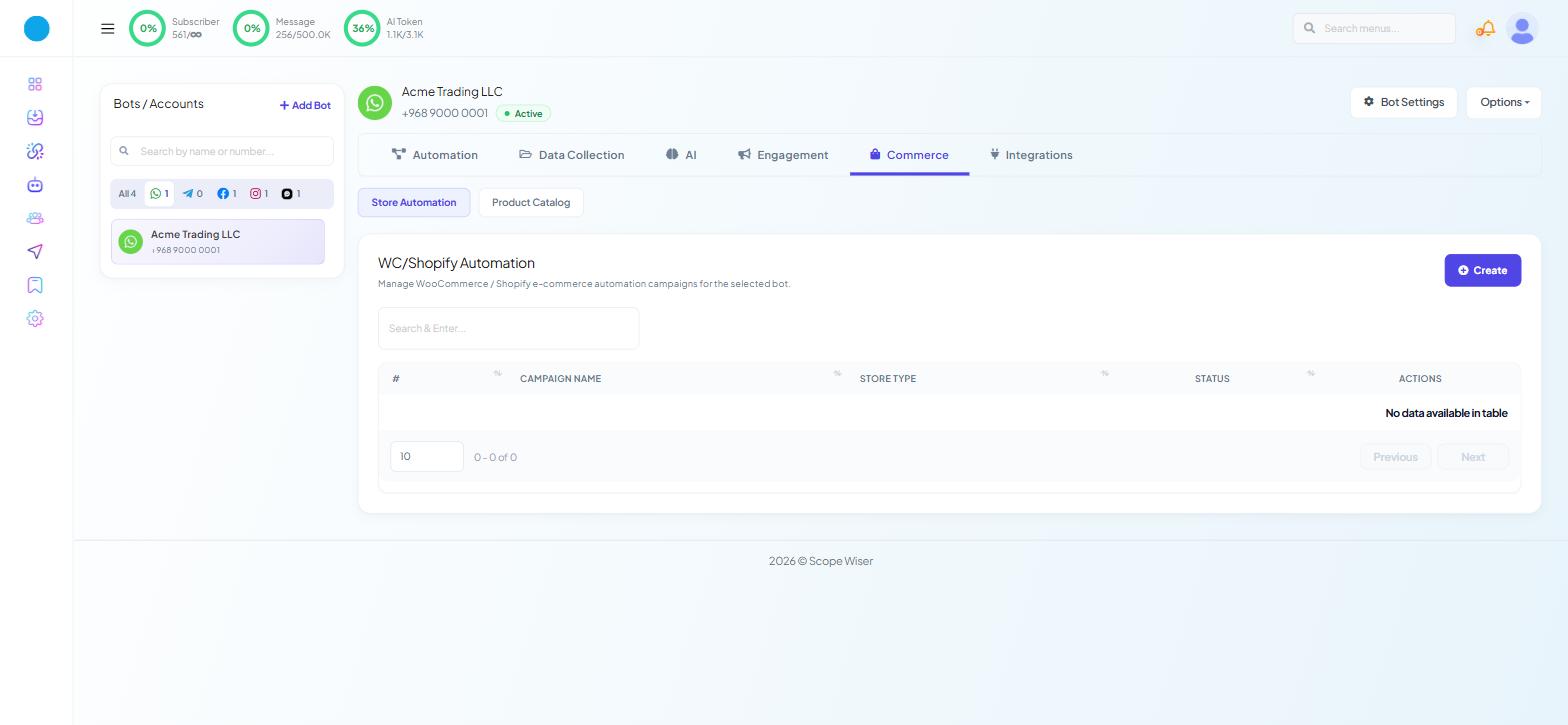
Facebook, Instagram and Webchat bots have no Commerce tab. If you sell through those channels, the equivalent is built from message blocks and API lookups in the Flow Builder instead.
6. Structured forms where conversation is the wrong shape
Free conversation is poor at collecting six fields accurately. The counter-trend is a structured interface inside the chat — a form, a date picker, a dropdown — for the moments where structure helps.
Under Chatbot Manager › Data Collection, WhatsApp bots have WhatsApp Flows alongside User Input Flows. The WhatsApp Flows screen offers Sync, Flows Studio (Beta) and + Create; the Studio builds multi-screen flows from a field library including Heading, Text body, Text input, Textarea, Number, Date and Dropdown.
User Input Flows, available on WhatsApp, Facebook, Instagram and Webchat alike, do the same job conversationally: a series of questions asked inside the chat, with each answer stored where your automation can use it later. Surveys, order collection, reservations and appointment details all fit that shape.
7. Handover treated as a feature, not a failure
The mature position is that escalation is part of the design, not evidence the bot lost. What customers object to is not being handed to a person; it is being handed over badly and having to start again.
The Shared Inbox is where that lands, with rail filters Mine, All, Important, Unread, Archived, Blocked and Resolved. The conversation panel carries a Customer Snapshot, Automation & Flow, Assigned Agent, Labels, Lists and Message Sequence — the context that stops the customer repeating themselves. Quick Actions include Pause Bot and Pause AI, so automation stops talking over your colleague.
8. Language as table stakes
Serving customers in their own language has moved from a differentiator to an expectation, particularly in markets where the buying language and the business language differ.
Two account-level fields under the profile menu at Account carry this: APPLICATION LANGUAGE and LIVECHAT TRANSLATION LANGUAGE. The Shared Inbox composer also has a translate control, for agents whose role has LIVE CHAT - TRANSLATOR enabled under Control Panel → User Permission.
Trends to be sceptical about
Not everything in circulation deserves a place on your roadmap.
Voice and video avatars. Genuinely growing, and almost entirely irrelevant to a business answering messages on WhatsApp. Revisit when your customers start sending voice notes faster than you can transcribe them.
AI companionship and always-on personality. A real consumer phenomenon that has very little to do with commercial support. Borrowing its tone makes a business bot sound evasive.
Anything quoted as a percentage improvement without a source you can check. The published numbers around conversational AI vary enormously by sector, baseline and definition. Measure your own deflection rate before and after; that figure is the only one that will survive a conversation with your finance team.
What to do next
Pick the two trends above that describe a gap you can name in your own operation, and build only those. If proactive messaging is the gap, start with Creating & Getting WhatsApp Templates Approved and a single Follow-up Sequence. If it is repetition in the queue, Automating the Service Desk: What to Hand Over and What to Keep covers the audit and the deflection layer. And if you want the same architecture worked through end to end for a specific sector, there are deep dives for Industry Deep Dive: Healthcare, Industry Deep Dive: Financial Services & Agent Banking, Industry Deep Dive: D2C eCommerce and Industry Deep Dive: Logistics.