
Automating the Service Desk: What to Hand Over and What to Keep
Most support teams do not have a volume problem. They have a repetition problem. Ten question types account for the bulk of the queue, none of them require judgement, and every one of them takes an agent out of a conversation that does.
Automation earns its place by removing that repetition without damaging the conversations that matter. That is a design job more than a configuration job, and the order you do it in decides whether it works.
Start with the audit, not the build
Pull three to six months of conversation history and count. You are looking for the ten most frequent request types, ranked by volume, and for each one: does answering it require any information the customer has not already given you?
That second question splits the list in two.
Answerable from what you already know — opening hours, delivery timescales, returns policy, pricing, "do you have a branch in X". These need a knowledge source and nothing else.
Answerable only after a lookup — order status, booking confirmation, account balance, outstanding invoice. These need an API call, and they need the customer to supply an identifier first.
Do the first group entirely before you touch the second. It is a smaller build, it deflects more volume, and it teaches you how your customers actually phrase things — which you will need when you write routing rules.
Build the deflection layer
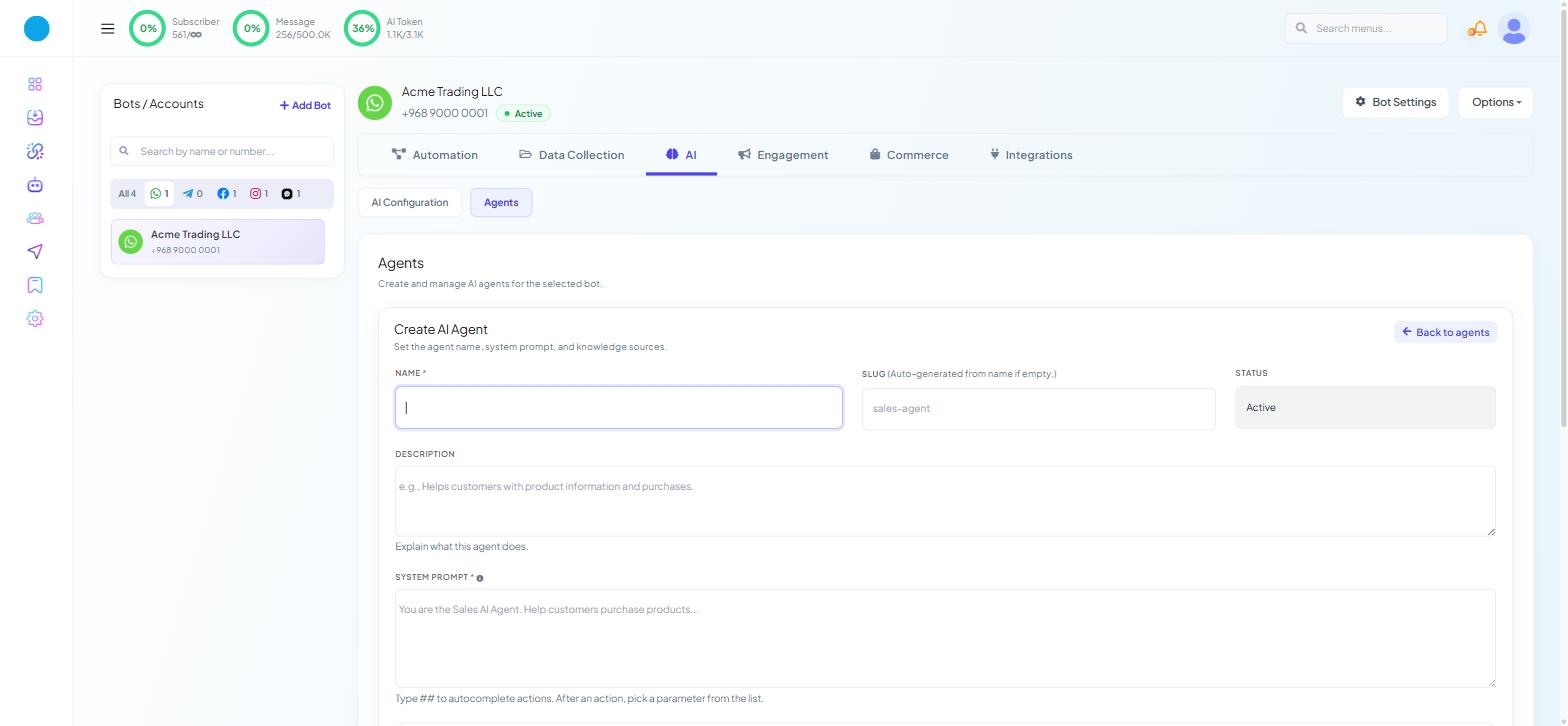
An AI agent answering from your own material is created under Chatbot Manager › AI › Agents with + Create Agent. The form asks for a NAME, an optional SLUG and DESCRIPTION, a SYSTEM PROMPT, and a Knowledge Set.
Under Knowledge Sources, material is attached by type: Content, URL, File, Media, Google Sheet or API. For a first support agent, two of those cover almost everything:
URL — point it at your existing help pages and policy pages rather than retyping them.
Google Sheet — for anything that changes often. Opening hours over a holiday period, current lead times, which branches are open. Support staff can edit a sheet; they will not edit a prompt.
You can combine them — a knowledge set holds several sources of different types, and the agent draws on all of them.
The system prompt is where the agent's boundaries live. Say what it answers, say what it must never answer, and say what it does instead. A support agent that invents a delivery date is worse than no agent at all.
Decide when the AI is allowed to speak
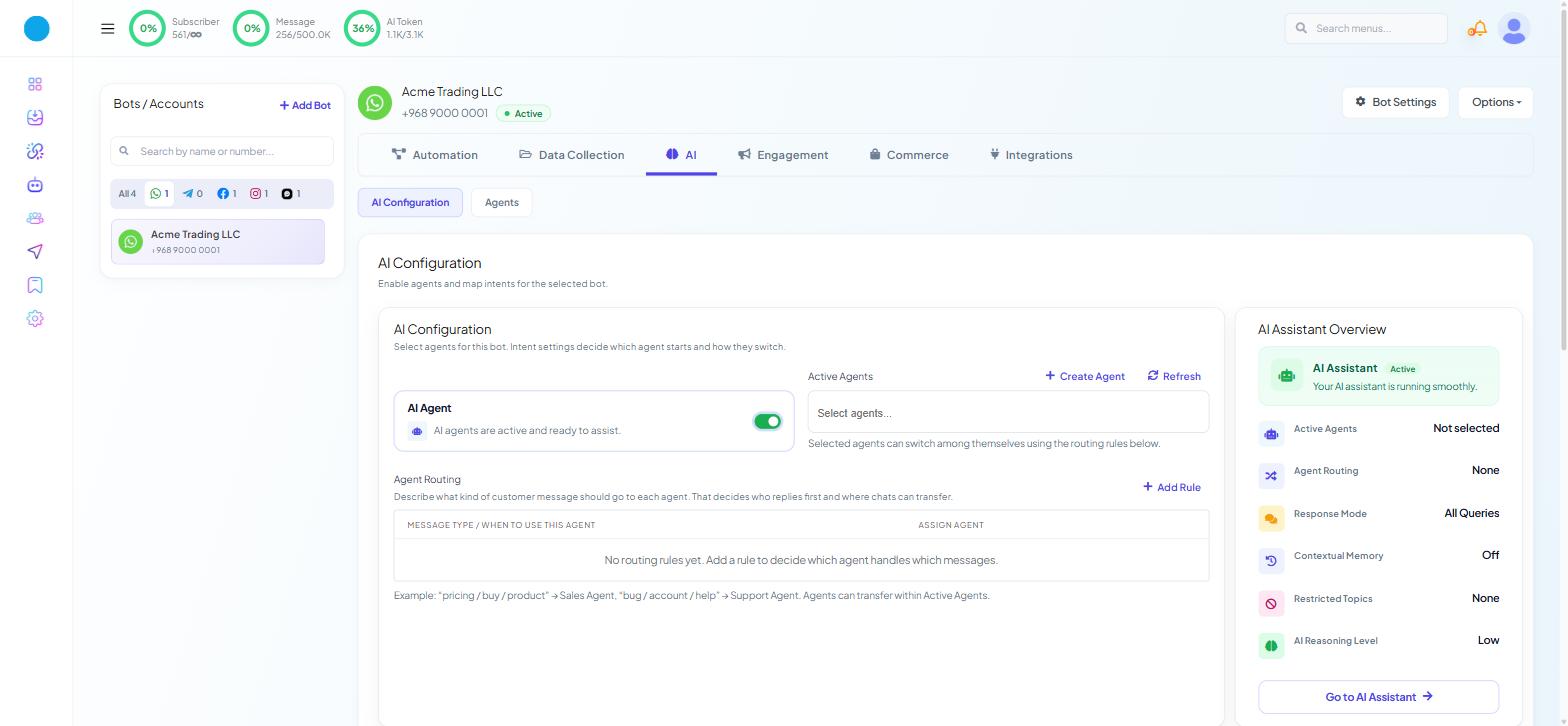
Under Chatbot Manager › AI › AI Configuration, turn on the AI Agent toggle — none of the settings below it render until you do — and the AI Response Mode section makes this an explicit choice between two options:
AI Agent for All Queries — the AI answers every message, even if a bot flow or keyword could match.
AI as a Fallback Only — bot flows and keywords run first, and the AI answers only when nothing matches.
If you already have keyword replies and flows working, fallback mode is the safer starting point.
Also worth setting on this screen:
Enable Contextual Memory, which reveals a Memory Window counting whole conversations. Without it, a customer who has already given their name or order reference may be asked again after a topic change.
Delay for AI Reply (Seconds) under Advanced Settings — default
0, maximum 60. A small delay reads as considered rather than robotic, and it lets a customer sending three short messages finish the thought first.Business Hours, which shows Time Zone, Business Hour and Off Days, with an Edit control. The related Do Not Assign Agent in Business Off Hour toggle appears twice on this page — once under Misc. Settings and once under Business Hours — so be clear which card you are changing.
Route by intent, not by keyword
Once you have more than one agent — support, sales, billing — the Agent Routing table decides who takes what. Turn on the AI Agent toggle, pick your agents in Active Agents, then use + Add Rule.
Each rule pairs a MESSAGE TYPE / WHEN TO USE THIS AGENT description with an ASSIGN AGENT choice; between them they decide who replies first and where chats can transfer. The product's own example is "pricing / buy / product" → Sales Agent, "bug / account / help" → Support Agent.
Write these from the audit you did at the start, using the customer's vocabulary rather than your internal team names. "I was charged twice" is a billing message even though the word billing never appears.
Design the handover before you need it
The handover is the part customers remember. Done badly, it undoes everything the automation saved.
Conversations reach a person in the Shared Inbox, where the left rail filters are Mine, All, Important, Unread, Archived, Blocked and Resolved. The conversation panel carries the context the agent gathered: a Customer Snapshot, an Automation & Flow section, Assigned Agent, Labels, Lists and Message Sequence.
Two Quick Actions matter during a handover: Pause Bot and Pause AI. Without pausing, the automation can keep replying over the top of your agent.
One constraint to plan around rather than discover: the snapshot shows when a WhatsApp conversation is Outside 24H Window. Past that point you cannot send a free-form reply — only an approved template. If your escalation path routinely takes longer than a day, build a template for the acknowledgement rather than relying on a typed reply.
Connect the lookups last
The second half of your audit list — the requests needing a real answer from a real system — is handled through Chatbot Manager › Integrations › HTTP API, called from a flow or from an agent.
One rule prevents most failures: collect and confirm every required parameter before you make the call. An order lookup needs the order reference and whatever second factor your system expects, saved and verified, before the request fires. An agent that calls the API early gets nothing back and is then tempted to fill the gap itself.
For proactive notifications running the other way — your system telling Scope Wiser that an order shipped — Chatbot Manager › Automation › Webhook Workflows builds automation from data received by a third-party webhook call, tying incoming data to a MESSAGE TEMPLATE.
Anything that has no API at all can still be automated through Google Sheets under Integrations, which is often enough for a small operation.
What to keep human
Automate the repetitive and the factual. Keep complaints, anything involving money the customer did not expect to spend, anything where the customer is already upset, and anything genuinely novel. Those conversations are where retention is won, and they are exactly the ones your agents now have time for.
Set Restricted Topics under Behavior & Restrictions to keep the AI out of those areas by design, with Response for Restricted Keywords carrying the message it sends instead.
What to do next
Build the deflection layer first and measure it for a fortnight before adding lookups. When you are ready for the API half, Calling External APIs From a Flow covers the request setup and response mapping in detail. If you are automating a support desk for a specific sector, the industry deep dives work through the same architecture with sector-specific constraints: Industry Deep Dive: Healthcare, Industry Deep Dive: Financial Services & Agent Banking, Industry Deep Dive: D2C eCommerce and Industry Deep Dive: Logistics.